
Home / Trades / Carpenters

Gate Ready for carpenters

Write your carpentry SWMS on your phone.

Start from a job you do every week, check the fall, nail gun and truss controls, add photos of the site and get your crew to sign. Your first SWMS is free.

  • Suggested controls for falls, wall frames and trusses
  • Nail gun and crane lift controls ready to check
  • Draft, sign on and save your PDF when the signal drops

Open the sample PDF (9 pages)

Download on the App StoreGet it on Google Play

Coming soon to the App Store and Google Play. Built for patchy reception.

Gate Ready is a drafting tool. It doesn't certify or check compliance, and you review every SWMS.

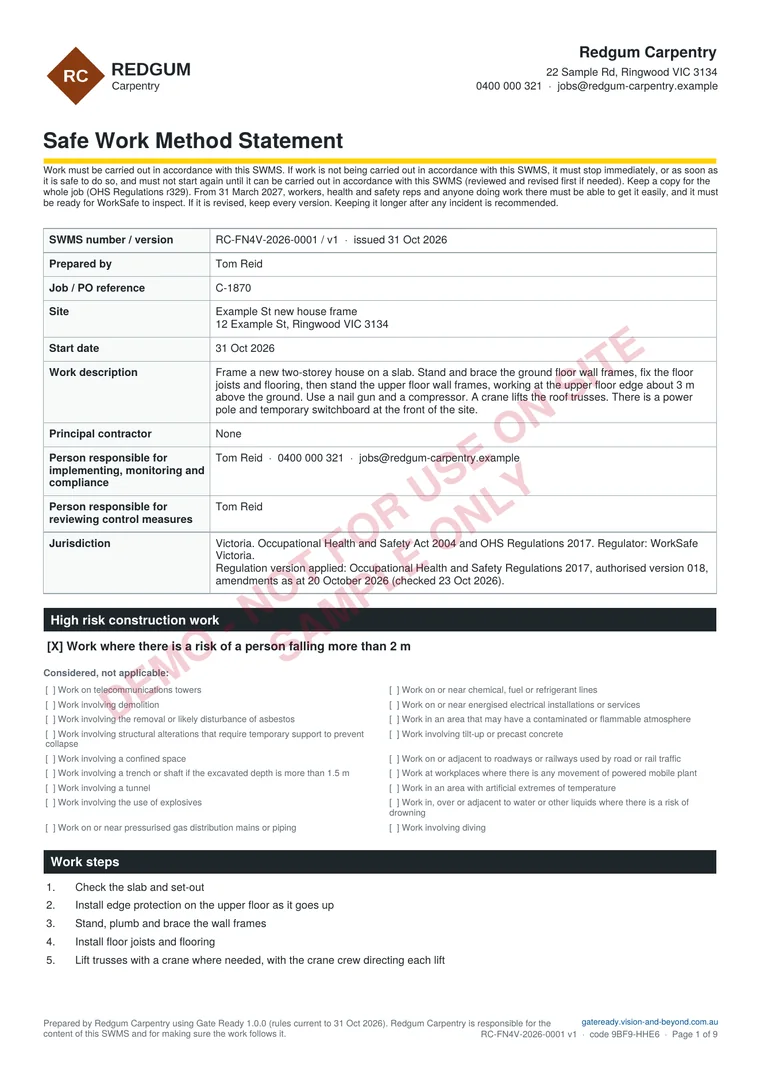
First page of a sample Gate Ready SWMS PDF for framing a two-storey house in Victoria

Sample SWMS, page 1 of 9

Plan, photos and sign-on, all in one PDF

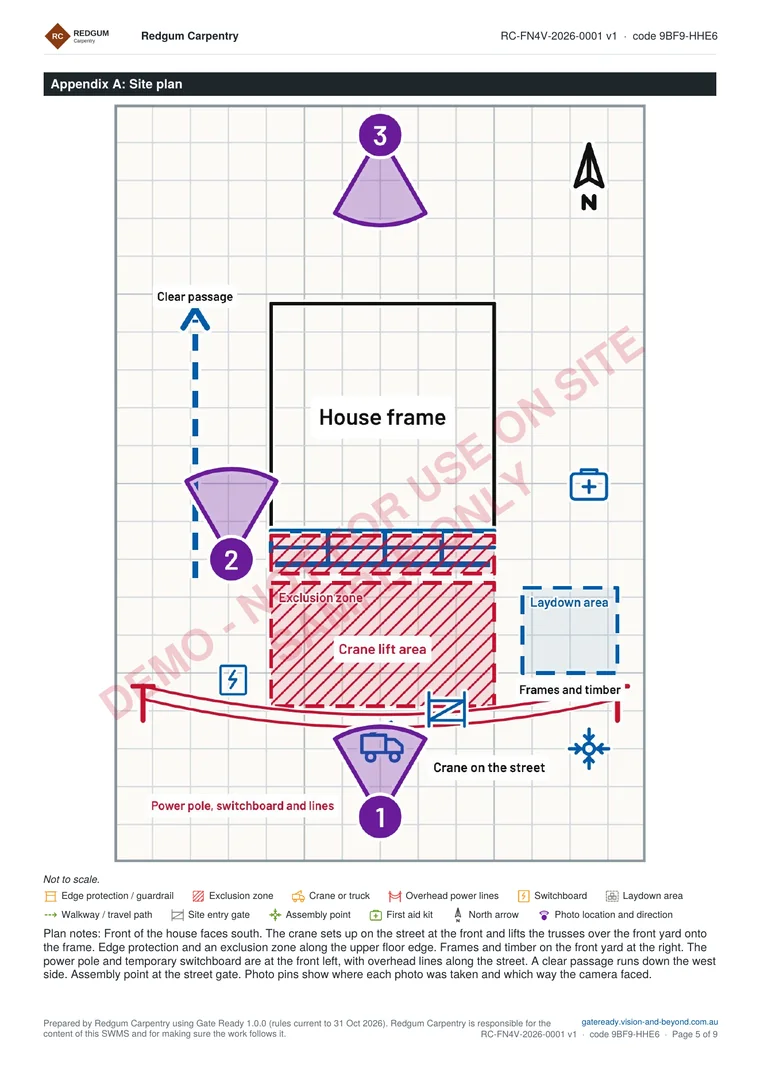
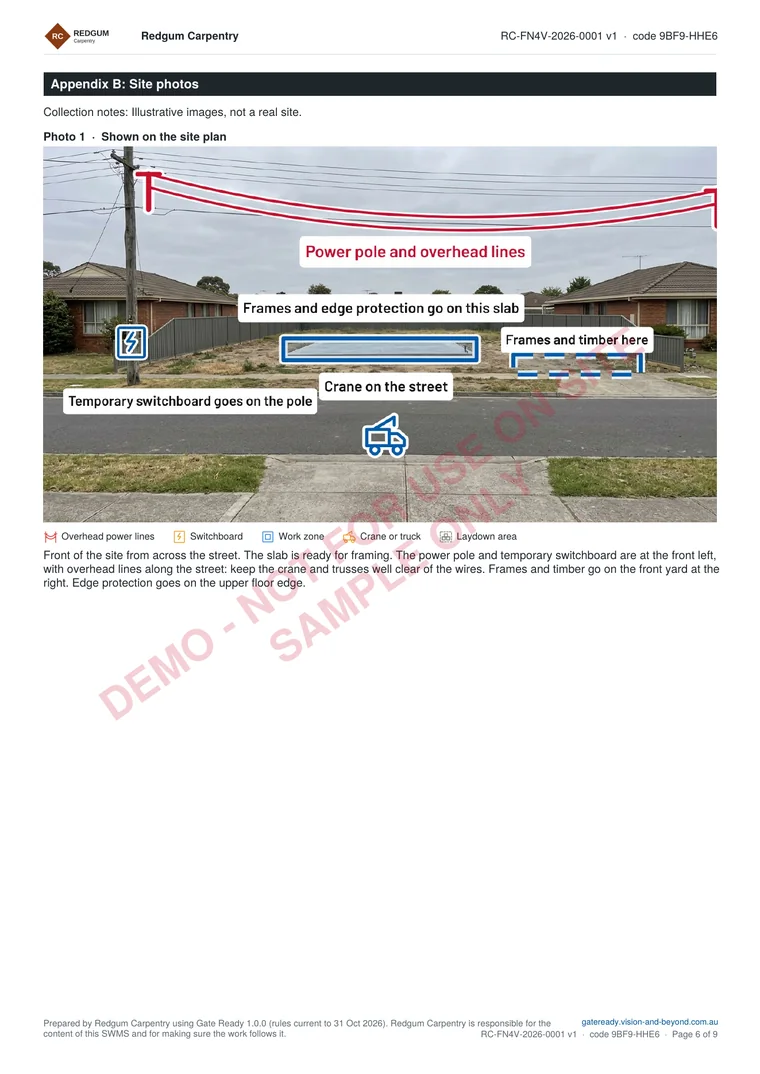
Page 1 is above. Here are the site plan and a marked-up photo page. The sample is for framing a two-storey house in Victoria, with a crane lift for the trusses. It is for a fictional business and not for use on site. The photos are illustrations.

Open the sample PDF (9 pages) or see more samples

Appendix A of the sample SWMS: a site plan with edge protection, an exclusion zone, a crane lift area at the street, a power pole with overhead lines and three numbered photo pinsAppendix B of the sample SWMS: a marked-up photo of a concrete slab on a vacant block with the power pole, overhead lines, crane position and laydown area labelled

Start from a job you actually do

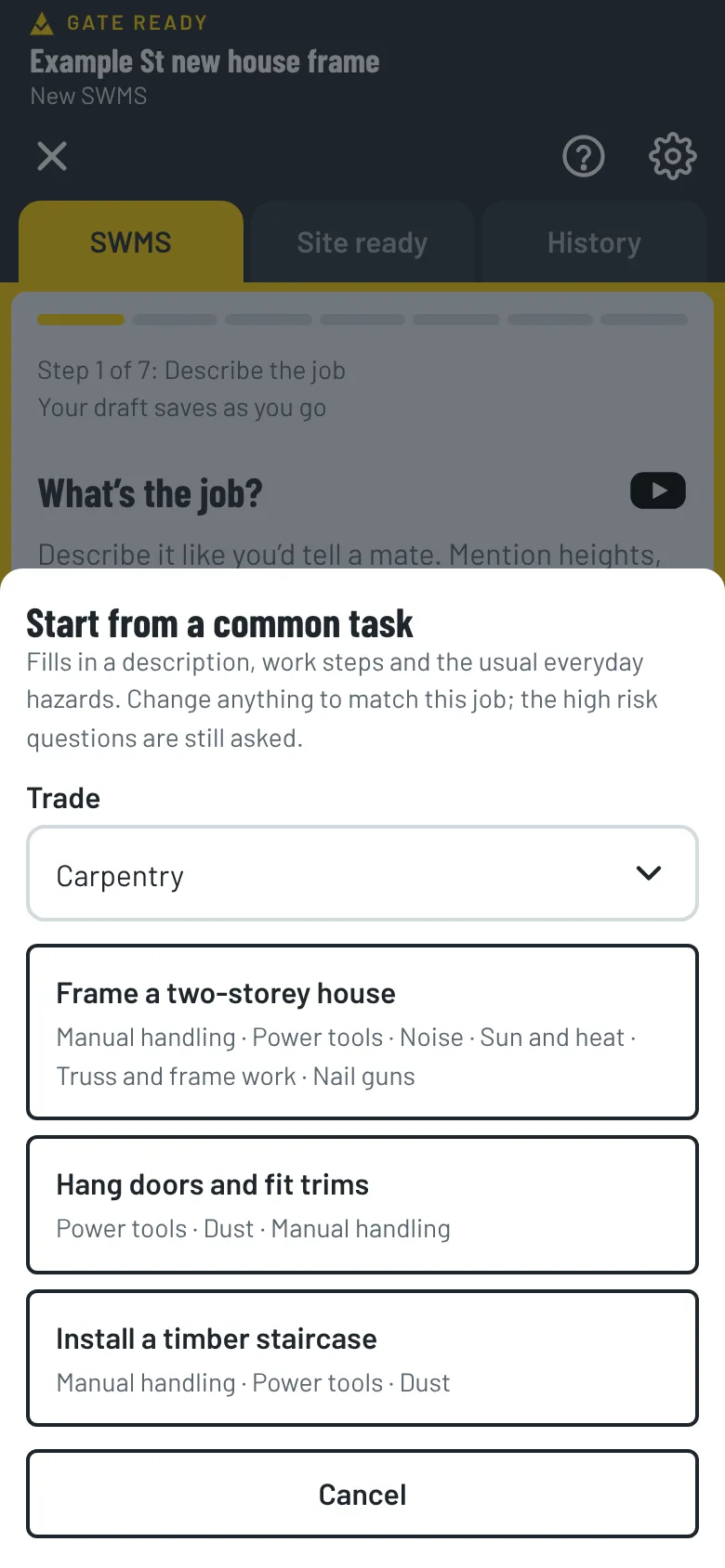
Pick Carpentry when you set up the app and the common tasks match your work. Each one comes with the steps and hazards already suggested. You check and change them.

Frame a two-storey house

Stand and fix timber wall frames and floor joists on a two-storey house, working at the upper floor edge.

  1. Check the slab and set-out
  2. Install edge protection on the upper floor as it goes up
  3. Stand, plumb and brace the wall frames
  4. Install floor joists and flooring
  5. Lift trusses with a crane where needed, with the crane crew directing each lift
Hang doors and fit trims

Hang internal doors and fit architraves and skirting.

  1. Check the openings
  2. Hang the doors and fit the hardware
  3. Cut and fit architraves and skirting
  4. Clean up offcuts and dust

Install a timber staircase

Install a timber staircase in an existing stairwell, with an open void on one side.

  1. Barricade or cover the void before starting
  2. Lift the stringers and treads into place with a team
  3. Fix the staircase and balustrade
  4. Remove the barricades only once the balustrade is fixed

Do decks, pergolas or formwork too?

Pick every trade you do when you set up. Common tasks, hazards and ticket suggestions for each one show up together.

  • Builder
  • Decking and pergolas
  • Formwork
  • Shed and carport building
  • Kitchen and bathroom installation

Carpentry hazards and controls, ready to check

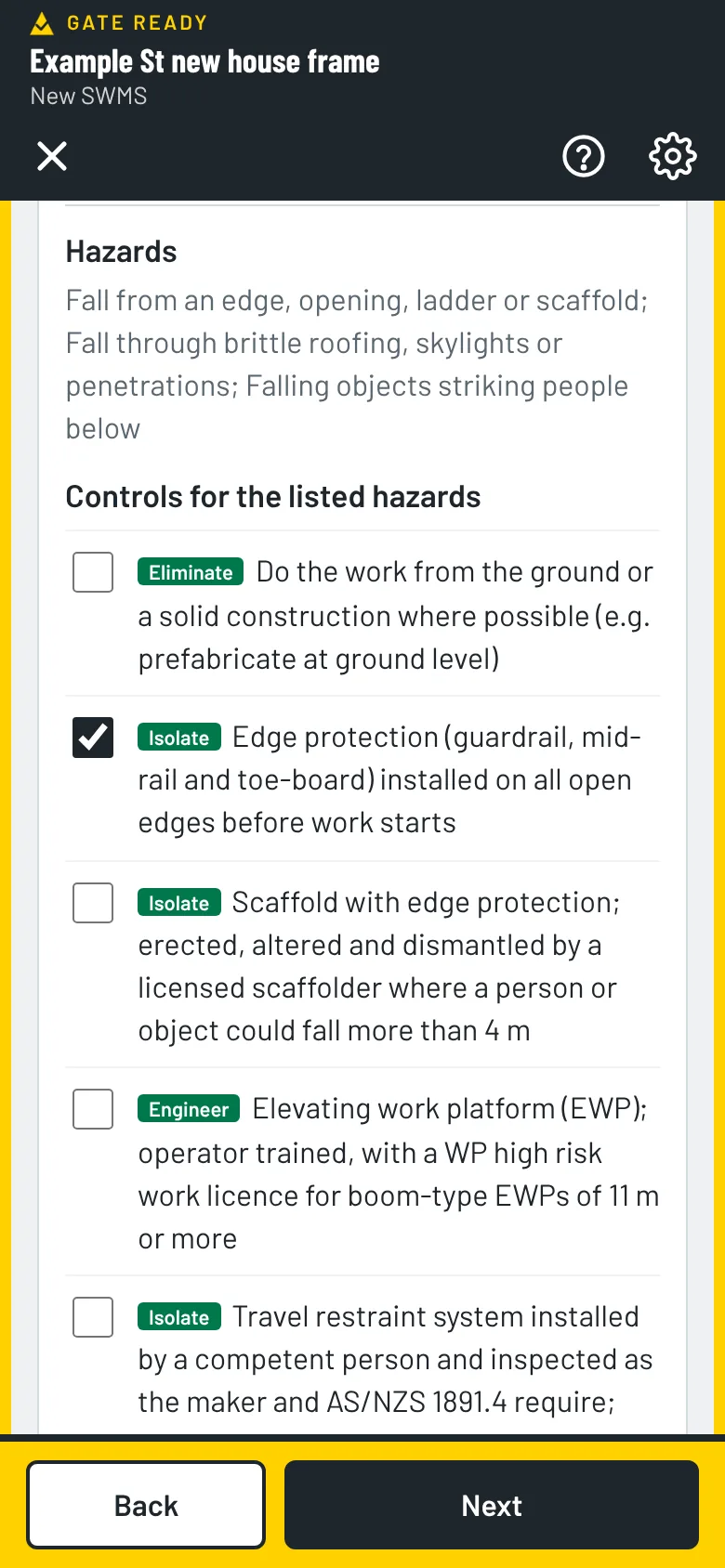
When the job is at height, Gate Ready adds the hazards (a fall from an edge or opening, falling objects, and truss and frame work) and controls like these. Each one shows its type.

  • IsolateEdge protection (guardrail, mid-rail and toe-board) installed on all open edges before work starts
  • EngineerTrusses lifted into place by crane and braced as the designer says before anyone climbs on them
  • AdminNobody walks on unbraced bottom chords
  • AdminWork done from a solid platform, never from open floor joists
  • AdminOnly trained workers use nail guns, following the maker’s manual
  • AdminBump-fire guns never used on ladders or elevated work with a loaded gun, in tight spaces, or where others could enter the firing path
  • AdminLoads not slung at different heights; exclusion zones for the lifting area, landing area and the path the load travels

Scaffold, an elevating work platform, travel restraint and rescue lines are in the list too, and start unticked. You choose the ones that fit your job. A risk of a fall of more than 2 m is on the model national list of high risk construction work, and some states set their own height rules, so check your regulator. Gate Ready suggests, you review.

Gate Ready hazards and controls screen with a list of controls to tick

Old house? Check for asbestos first.

Jobs on older houses can involve asbestos in eaves, wall sheeting and linings. Gate Ready asks when the building was built and whether you’ll cut, drill or remove existing materials. Asbestos was banned in Australia from 31 December 2003, so anything built or renovated before 2004 may contain it.

Photograph the slab, the side passage and the lift area

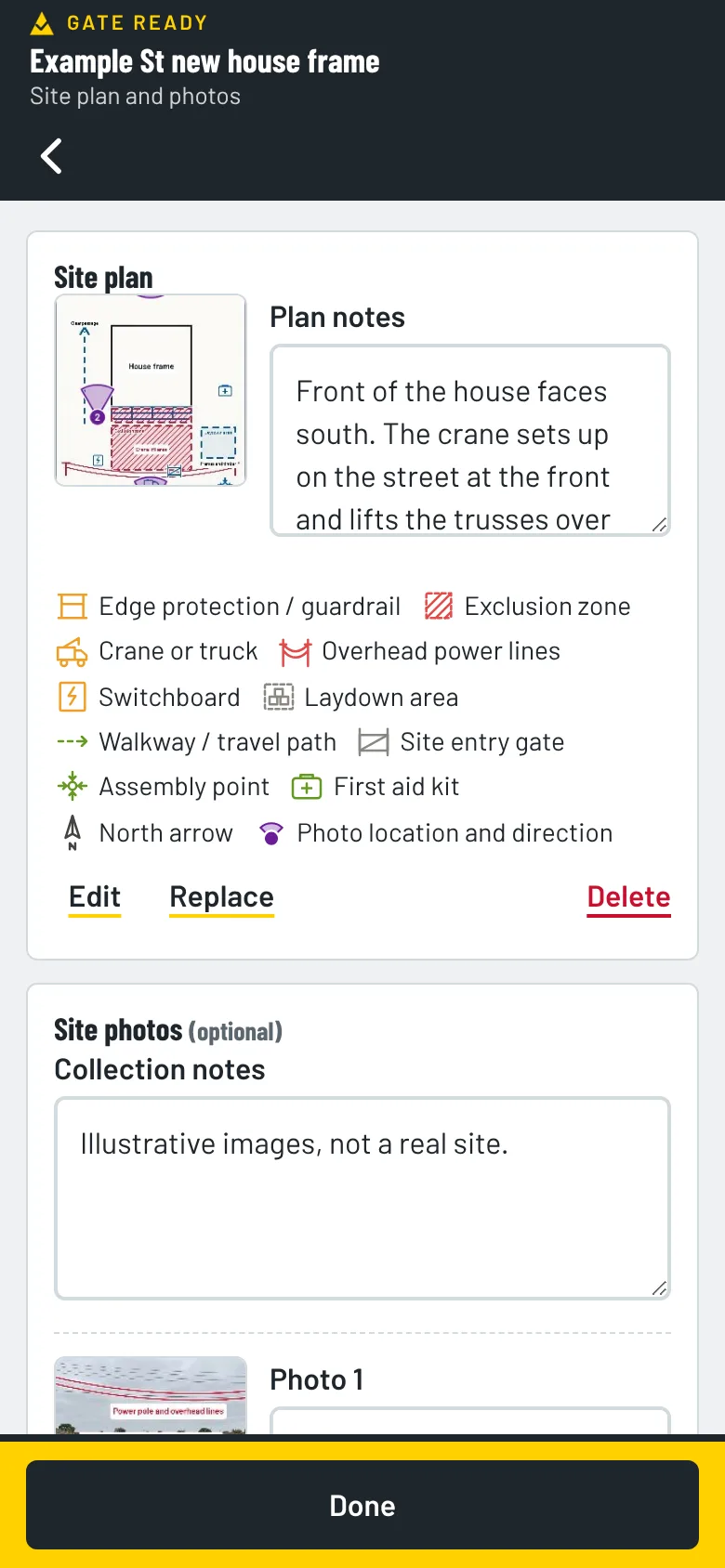
Take photos of the front, the side passage and the back yard before you start. Mark up the edge protection, the power pole, the crane lift area and the exclusion zone, and pin each photo to a site plan. They print with your SWMS. Photos stay on your phone. We can’t see them.

See all the features

Gate Ready site plan with three numbered photo pins and a list of the symbols used

Keep your licences and tickets in one place

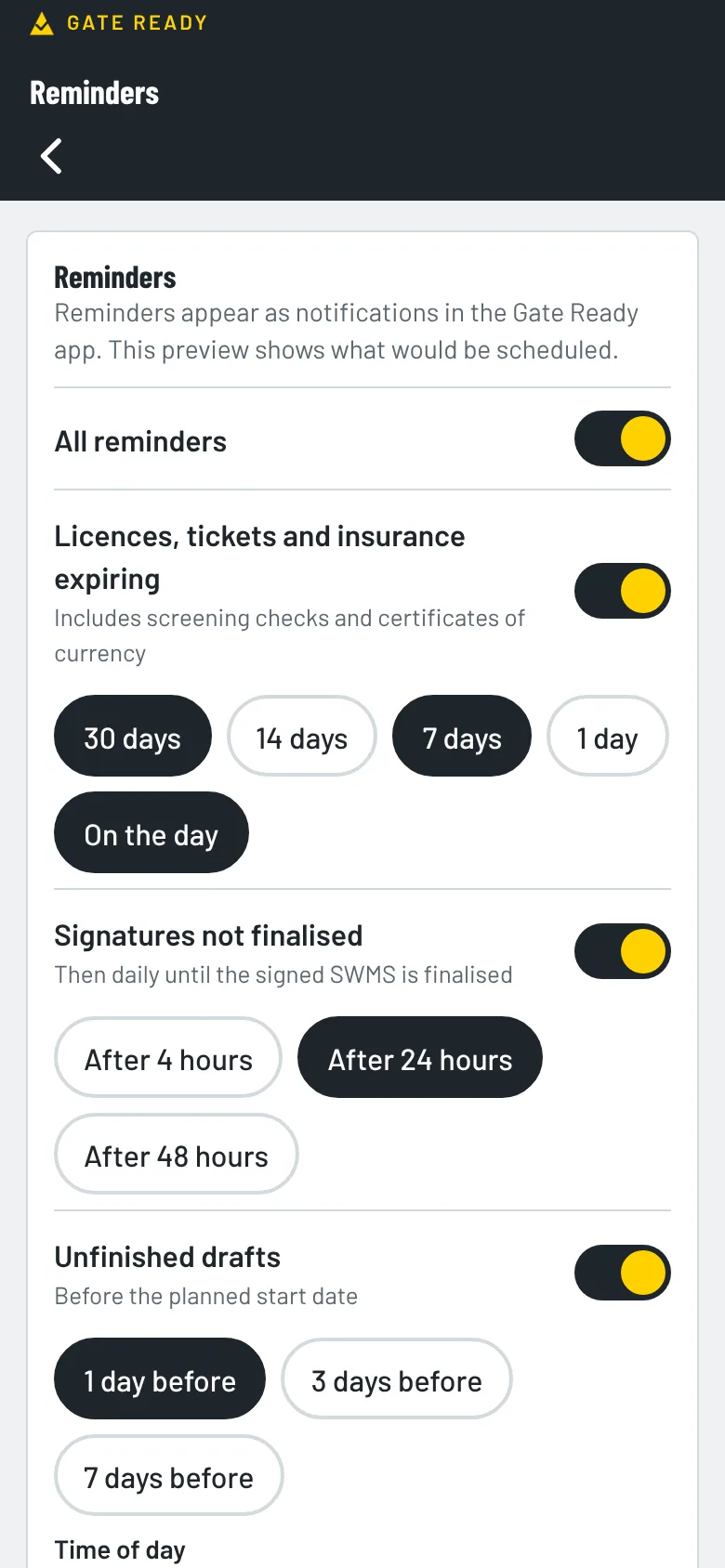
Gate Ready suggests a builder licence or registration and working at heights training for carpentry. Add the dates and it reminds you before they run out. Add your White Card and insurance too.

  • Builder licence or registration
  • Working at heights training
  • White Card
  • CPR
  • Insurance
Gate Ready reminders screen for licences, insurance and unfinished SWMS

How much does it cost?

Your first SWMS is free. Then you get a one-month free trial. After that it's $24.99 a month, GST included.

The App Store or Google Play bills you. You can cancel any time in your store account. Try the sample jobs first. They don't use your free SWMS.

Common questions from carpenters

What height controls does Gate Ready suggest for framing?

It suggests controls like edge protection at the upper floor, safe access and rescue planning. You tick the ones that fit the job and add your own.

Can I mark the crane lift and the power lines on my photos?

Yes. Add symbols such as crane or truck, crane swing radius, overhead power lines, edge protection and exclusion zones, then pin each photo to a site plan. Photos stay on your phone.

Does it cover nail guns and truss work?

Yes. Framing jobs suggest nail gun controls such as sequential triggers, and truss and frame controls such as bracing before anyone climbs on them. You decide what applies to your job.

Does it work on site with no signal?

Yes, for most of the job. Gate Ready is built for patchy reception. You can draft, sign on and save your PDF without a signal. It checks your subscription when it’s online. If it can’t check for 14 days, you can keep working on SWMS you’ve already started, but you can’t start a new one until it reconnects. Sending a copy needs a connection.

Where are my signed SWMS kept?

They stay on your phone. You export a PDF, and that exported copy is your record.

Does it cover my state?

Yes. It covers all eight Australian states and territories. Always check the result against your job, your site and your regulator.

What does it cost?

Your first SWMS is free. Then you get a one-month free trial. After that it’s $24.99 a month, GST included. The App Store or Google Play bills you, and you can cancel any time in your store account. Try the sample jobs first. They don’t use your free SWMS.

More answers on the FAQ page. Not a carpenter? Gate Ready covers more than 70 trades. See the full list.

Samples for other trades

Get Gate Ready for carpentry work

Coming soon to the App Store and Google Play. Your first SWMS is free.

Download on the App StoreGet it on Google Play
Your first SWMS is freeGet the app