Home / Trades / Roofers

Gate Ready for roofers

Write your roofing SWMS on your phone.

Start from a job you do every week, check the fall and skylight controls, add photos of the roof and the power line and get your crew to sign. Your first SWMS is free.

  • Suggested controls for falls, skylights and fragile roofs
  • Asks about asbestos on older roofs
  • Draft, sign on and save your PDF when the signal drops

Open the sample PDF (9 pages)

Download on the App StoreGet it on Google Play

Coming soon to the App Store and Google Play. Built for patchy reception.

Gate Ready is a drafting tool. It doesn't certify or check compliance, and you review every SWMS.

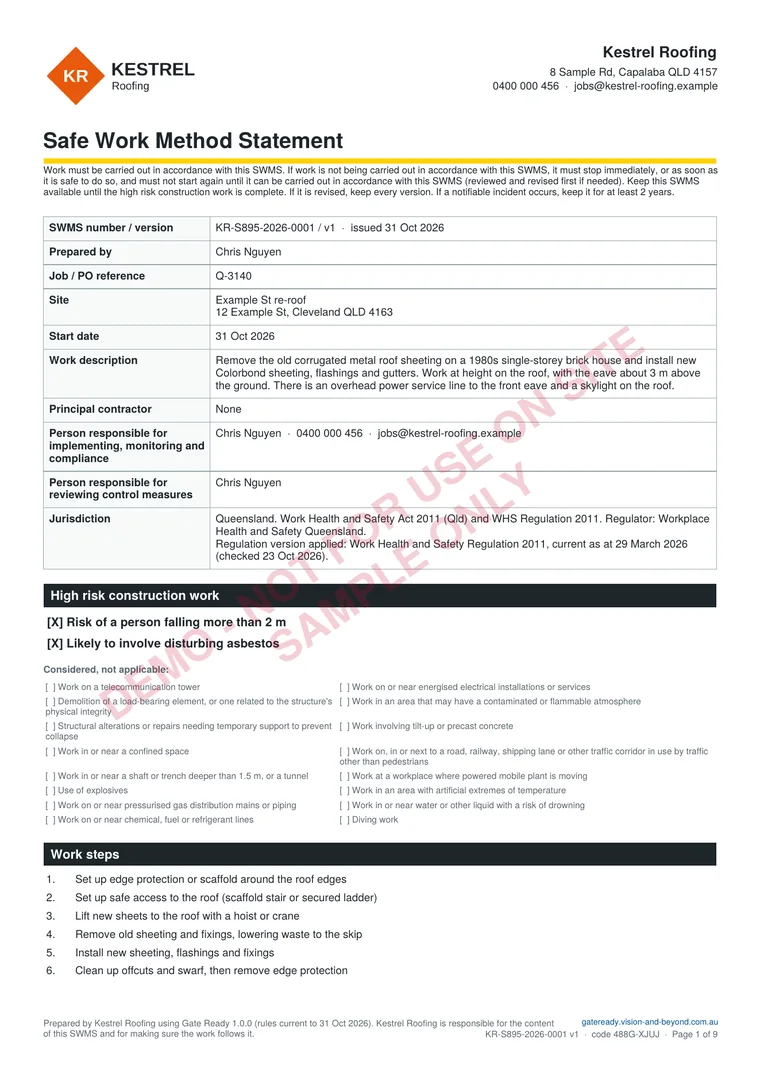
First page of a sample Gate Ready SWMS PDF for replacing roof sheeting on a house in Queensland

Sample SWMS, page 1 of 8

Plan, photos and sign-on, all in one PDF

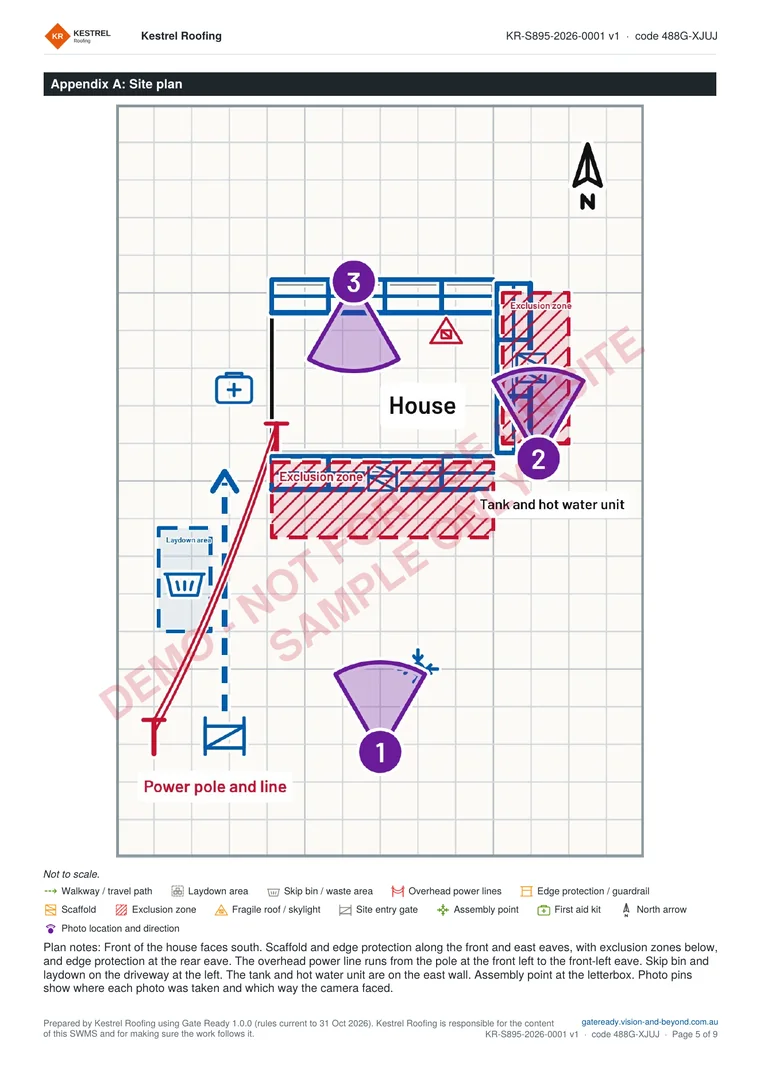
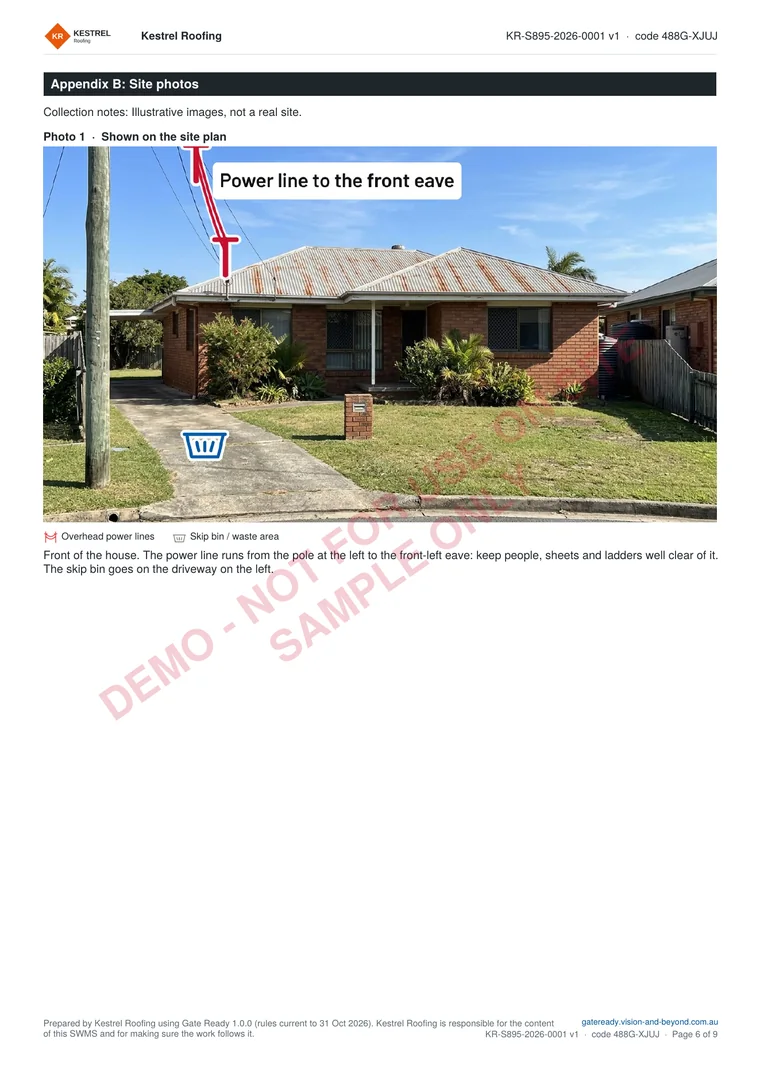
Page 1 is above. Here are the site plan and a marked-up roof photo. The sample is for replacing old roof sheeting on a 1980s house in Queensland. It is for a fictional business and not for use on site. The photos are illustrations.

Open the sample PDF (9 pages) or see more samples

Appendix A of the sample SWMS: a site plan with a skip bin, an overhead power line, scaffold and edge protection along the eaves, exclusion zones and three numbered photo pinsAppendix B of the sample SWMS: a marked-up photo of an old corrugated metal roof with a skylight flagged as a fall-through risk and an anchor point

Start from a job you actually do

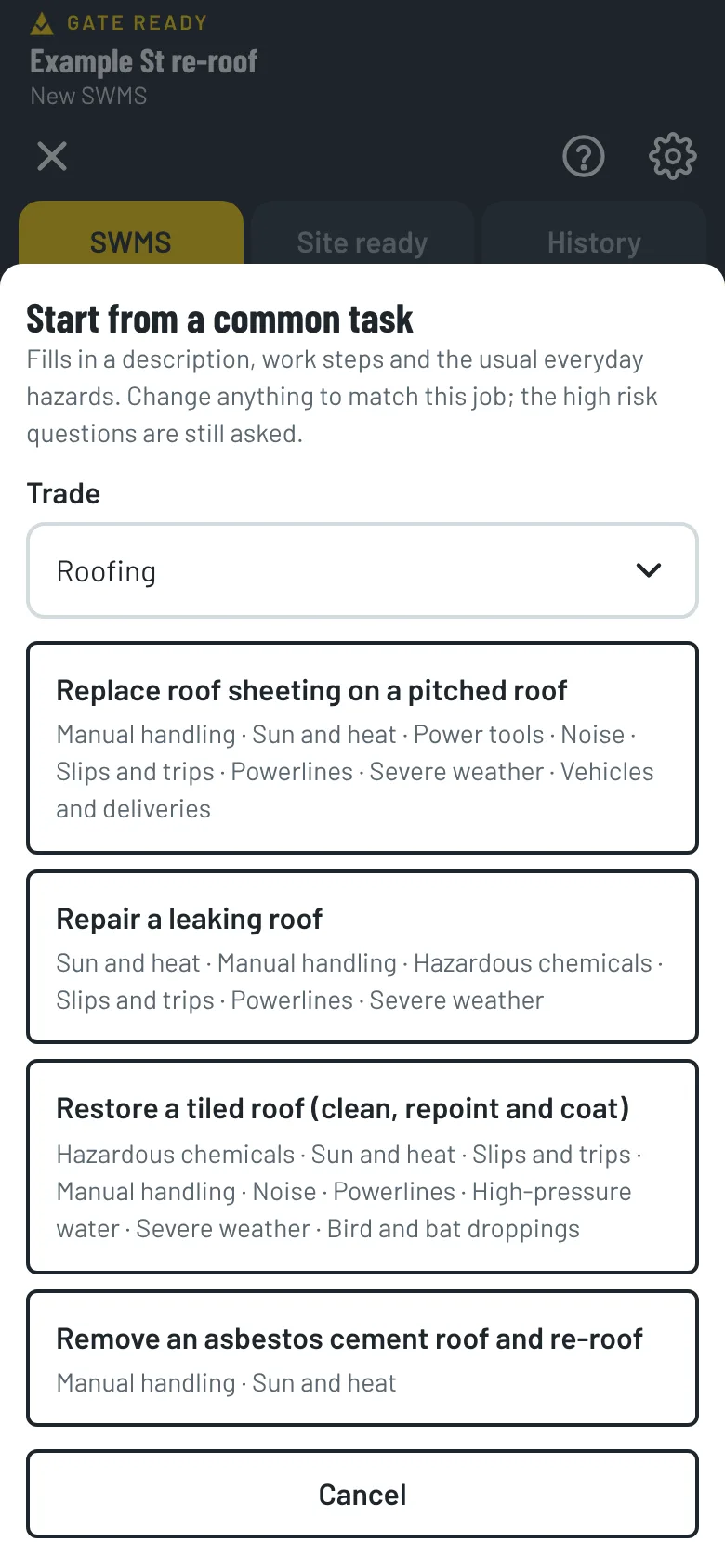
Pick Roofing when you set up the app and the common tasks match your work. Each one comes with the steps and hazards already suggested. You check and change them.

Replace roof sheeting on a pitched roof

Remove and replace metal roof sheeting on a pitched roof, working at height on the roof.

  1. Set up edge protection or scaffold around the roof edges
  2. Set up safe access to the roof (scaffold stair or secured ladder)
  3. Lift new sheets to the roof with a hoist or crane
  4. Remove old sheeting and fixings, lowering waste to the skip
  5. Install new sheeting, flashings and fixings
  6. Clean up offcuts and swarf, then remove edge protection

Repair a leaking roof

Inspect and repair a leaking roof, replacing damaged tiles or sheets and resealing flashings.

  1. Set up safe access, and edge protection or roof anchors
  2. Inspect the roof and find the source of the leak
  3. Replace damaged tiles or sheets
  4. Reseal or replace flashings
  5. Clean up and remove access equipment

Restore a tiled roof (clean, repoint and coat)

Pressure clean, repoint ridge capping and apply a roof coating to a tiled roof.

  1. Set up edge protection or scaffold, and safe access
  2. Pressure clean the tiles and let the roof dry
  3. Replace broken tiles and repoint the ridge capping
  4. Apply the roof coating
  5. Clean up and remove access equipment

Do roof plumbing or cladding too?

Pick every trade you do when you set up. Common tasks, hazards and ticket suggestions for each one show up together. There is also a task for removing an asbestos cement roof and re-roofing, where a licensed removalist takes the old sheeting off.

  • Roof plumbing
  • Cladding
  • Gutter cleaning
  • Solar
  • Antenna and satellite

Roof hazards and controls, ready to check

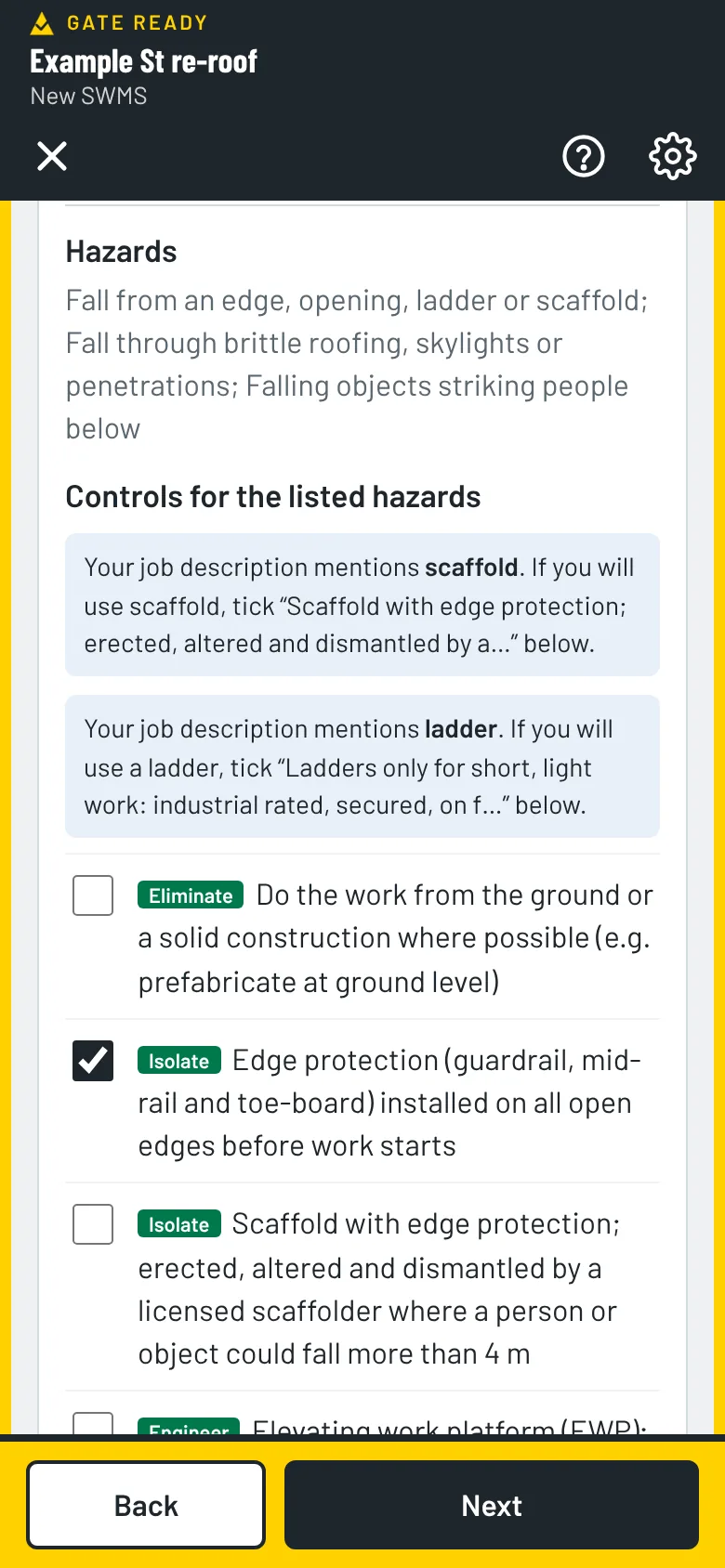
When the job is at height, Gate Ready adds the hazards (a fall from an edge or ladder, a fall through brittle roofing or a skylight, falling objects, and storms and lightning) and controls like these. Each one shows its type.

  • IsolateEdge protection (guardrail, mid-rail and toe-board) installed on all open edges before work starts
  • EngineerSkylights, penetrations and brittle roofing covered or meshed before access
  • AdminEvery roof treated as fragile until a competent person says it is not
  • AdminExclusion zone below the work area; tools and materials secured against falling
  • AdminStop work in high wind, rain, or when surfaces are wet or icy
  • AdminForecast checked before work and again at smoko; the stop-work points for this job written down and told to the crew
  • AdminOverhead powerlines identified; plant, scaffold and ladders kept outside the network operator’s approach distances

Scaffold, an elevating work platform, travel restraint and a catch platform are in the list too, and start unticked. You choose the ones that fit your job. A risk of a fall of more than 2 m is on the model national list of high risk construction work, and some states set their own height rules, so check your regulator. For jobs on a roof, a severe weather group is suggested too. Bird and bat droppings steps appear for roof cleaning and gutter work. Gate Ready suggests, you review.


Gate Ready hazards and controls screen with a list of controls to tick

Old roof? Check for asbestos first.

Roofs and eaves on older houses can contain asbestos cement. Gate Ready asks when the building was built and whether you’ll cut, drill or remove existing materials. Asbestos was banned in Australia from 31 December 2003, so anything built or renovated before 2004 may contain it.

Photograph the roof, the power line and the access

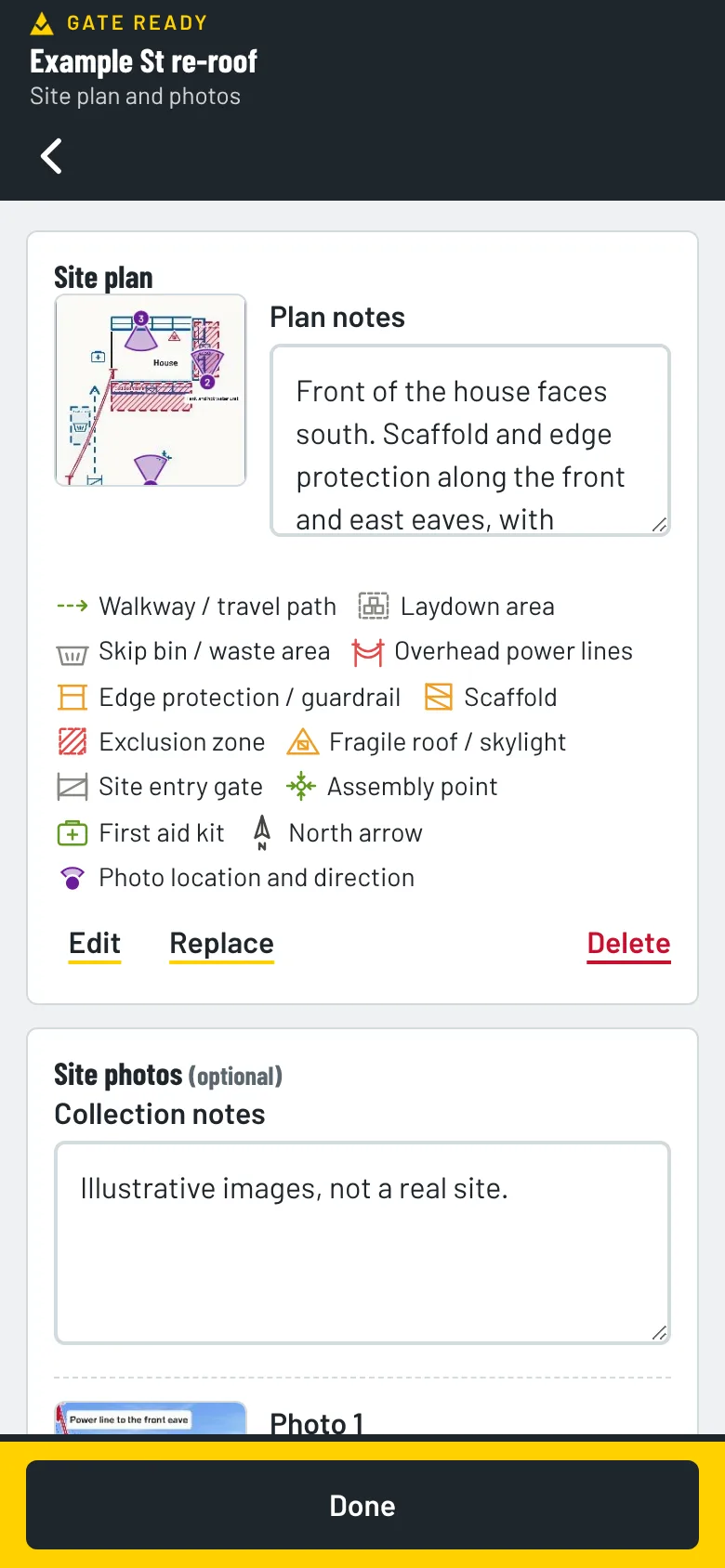
Take photos of the front, the side access and the roof before you start. Mark up the power line, scaffold, skylights and exclusion zone, and pin each photo to a site plan. They print with your SWMS. Photos stay on your phone. We can’t see them.

See all the features

Gate Ready site plan with three numbered photo pins and a list of the symbols used

Keep your licences and tickets in one place

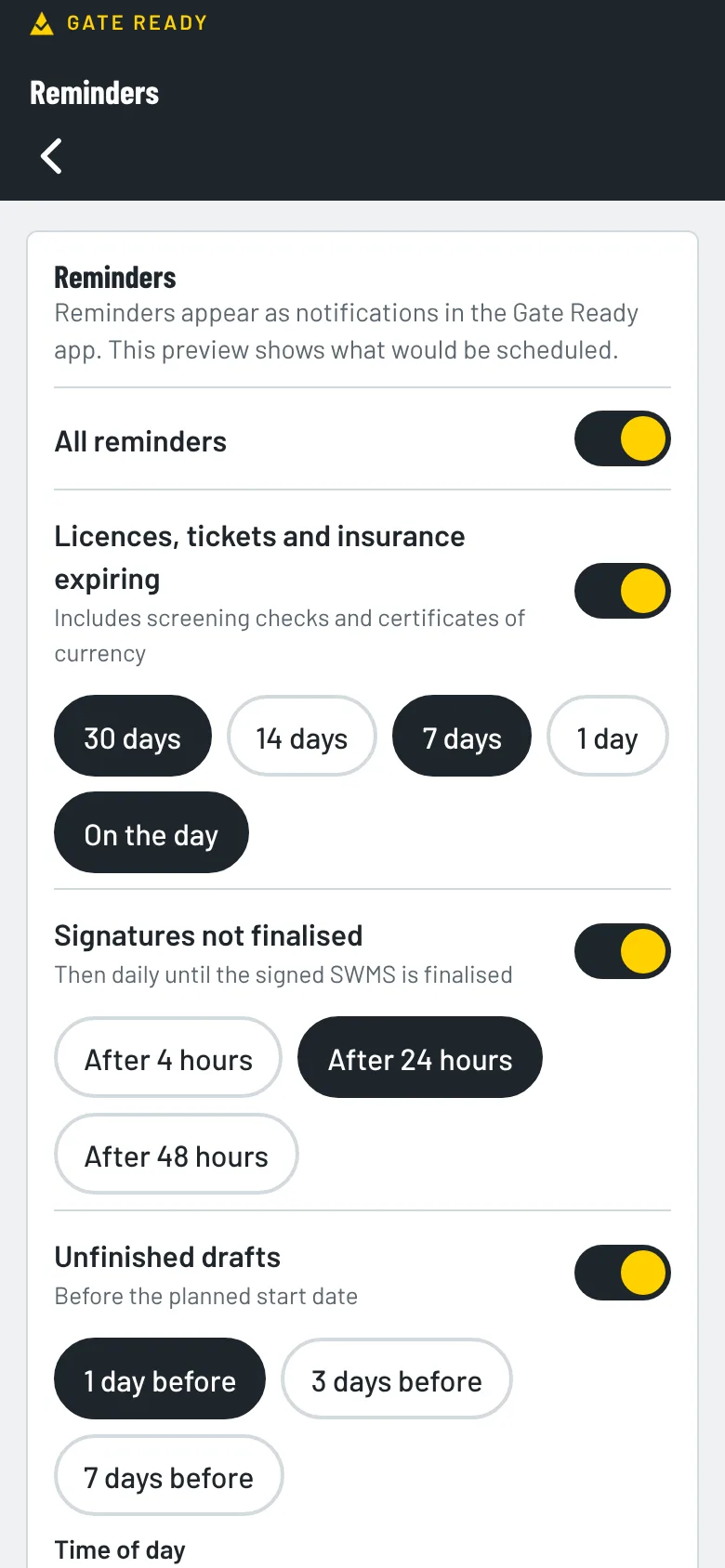
Gate Ready suggests working at heights training for roofing. Add the dates and it reminds you before they run out. Add your trade licence, White Card and insurance too.

  • Working at heights training
  • Trade licence
  • White Card
  • CPR
  • Insurance
Gate Ready reminders screen for licences, insurance and unfinished SWMS

How much does it cost?

Your first SWMS is free. Then you get a one-month free trial. After that it's $24.99 a month, GST included.

The App Store or Google Play bills you. You can cancel any time in your store account. Try the sample jobs first. They don't use your free SWMS.

Common questions from roofers

What height controls does Gate Ready suggest?

It suggests controls like edge protection, covering skylights and treating every roof as fragile. You tick the ones that fit the job and add your own.

Does Gate Ready cover storms and lightning?

Yes. It suggests a severe weather group for roof and ladder work: check the forecast, write down your stop-work points, know where to shelter and who decides when to restart. You set the wind speeds and lightning distances for the job.

Can I mark skylights and power lines on my photos?

Yes. Add symbols such as fragile roof or skylight, overhead power lines, scaffold and exclusion zones, then pin each photo to a site plan. Photos stay on your phone.

Does it cover metal, tile and roof plumbing jobs?

Common tasks cover replacing roof sheeting, repairing a leaking roof, restoring a tiled roof and removing an asbestos cement roof. Pick Roof plumbing too for gutters and downpipes.

Does it work on a roof with no signal?

Yes, for most of the job. Gate Ready is built for patchy reception. You can draft, sign on and save your PDF without a signal. It checks your subscription when it’s online. If it can’t check for 14 days, you can keep working on SWMS you’ve already started, but you can’t start a new one until it reconnects. Sending a copy needs a connection.

Where are my signed SWMS kept?

They stay on your phone. You export a PDF, and that exported copy is your record.

Does it cover my state?

Yes. It covers all eight Australian states and territories. Always check the result against your job, your site and your regulator.

What does it cost?

Your first SWMS is free. Then you get a one-month free trial. After that it’s $24.99 a month, GST included. The App Store or Google Play bills you, and you can cancel any time in your store account. Try the sample jobs first. They don’t use your free SWMS.

More answers on the FAQ page. Not a roofer? Gate Ready covers more than 70 trades. See the full list.

Samples for other trades

Get Gate Ready for roofing work

Coming soon to the App Store and Google Play. Your first SWMS is free.

Download on the App StoreGet it on Google Play
Your first SWMS is freeGet the app